EOSCore 2.2.0

GENERAL​

  • Added support for Windows ARM64 and Linux ARM64.
  • EOSCore now reports network status to EOS on Android and iOS
  • The EOS SDK log level now defaults to Warning

ONLINE SUBSYSTEM​

  • Parties
    Create and manage EOS lobby-based parties, invite players, and join through the EOS overlay
  • Voice Chat
    Added EOS RTC support through Unreal’s IVoiceChat interface, including lobby voice, device selection, mute, and volume controls
  • Title Files
    List and read files from EOS Title Storage
  • Entitlements
    Query EOS Ecom entitlements for players signed in with an Epic account

LOGIN​

  • Login now accepts named login types and supports Device Code sign-in
  • Failed Persistent Auth logins clear the stored token
  • Added a notification and a refresh function for expiring external login tokens
  • Fixed duplicate login callbacks, incorrect account IDs when two local players sign in, and issues with Device ID login, token refresh, and logout

EASY ANTI-CHEAT​

  • Added optional Easy Anti-Cheat integration with automatic client registration and configurable registration timeouts
  • Use a dedicated server to protect all players

EOSCore 2.1.0

Updated SDK to EOS SDK 1.20.0​

NEW​

Anti-Cheat

  • Get System Config returns the client’s system security configuration.
  • Get Persistent Setting and Set Persistent Setting read and write anti-cheat settings that are kept between game sessions, such as the strict injection policy. Windows only.
  • Register Client on the Anti-Cheat Server has a new Required System Config option. A client must meet it to join the protected session.

Auth

  • Cancel Login cancels an ongoing Account Portal or device code login. It is available as a function and as an async node.
  • New login flags: No User Interface and No Internal Retry.
  • Account Portal Redirect URL lets mobile games use an iOS Universal Link or Android App Link for the Account Portal login.
  • iOS Auth Handle Redirect URL completes a mobile Account Portal login from the URL your iOS app receives.

Presence

  • Has Explicit Presence.

PROJECT SETTINGS​

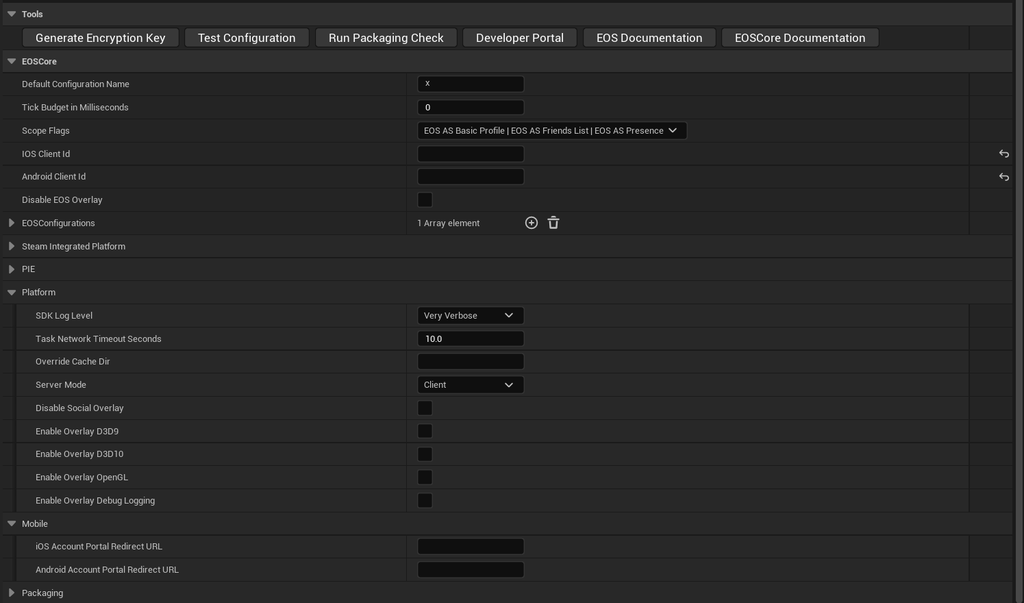
Find these under Project Settings > Game > EOSCore Plugin.

  • SDK Log Level, Task Network Timeout Seconds and Override Cache Dir can now be set in Project Settings instead of only in DefaultEngine.ini.
  • Server Mode decides when EOS runs as a server:
    • Client is the default and works as before.
    • Automatic runs dedicated servers as servers. Use it only if your dedicated server does not log in with a Device Id.
    • Server always runs EOS as a server.
  • Overlay options: Disable Social Overlay, Enable Overlay D3D9, D3D10 and OpenGL, and Enable Overlay Debug Logging.
  • iOS and Android Account Portal Redirect URL set a default redirect URL for the mobile Account Portal login.
  • EOSCore now warns you in the editor and in the log when a configuration still uses the default Encryption Key.

EDITOR TOOLS​

Tools in the EOSCore settings

  • Generate Encryption Key creates a unique key for every configuration that has no key, an invalid key or the default key. Existing keys are never replaced, so files saved with Player Data Storage stay readable.
  • Test Configuration contacts the EOS backend. It checks that your Client Id, Client Secret and Deployment Id are valid and that they match your Product Id and Sandbox Id.
  • Run Packaging Check, plus quick links to the Epic Developer Portal and the documentation.

Packaging check

  • When you cook your project, EOSCore checks your configurations. It looks for:
    • missing ids
    • an invalid or default Encryption Key
    • mobile Client Ids and redirect URLs
    • the Steam integration settings
  • Problems are logged as warnings. Turn on Treat Packaging Issues As Errors to stop the cook instead.

EOS status in the toolbar

  • A new EOS button next to Play shows how many Play In Editor clients are logged in to EOS.
  • Its menu lists the Product User Id and Epic Account Id of each client. Click an id to copy it.

EOSCore 2.0.0

GENERAL​

  • Every function in the EOS SDK is now available in EOSCore Blueprints
  • Three new interfaces: Kids Web Services (KWS), Integrated Platform and RTC Data
  • Lobby sessions in the Online Subsystem. Sessions can now be backed by EOS Lobbies
  • More login methods on the Login node: refresh token and every identity provider EOS supports
  • Steam Integrated Platform support
  • New Online Subsystem interfaces: Friends, Presence, User and External UI

LOGIN NODE​

  • Identity providers: the Login node now accepts a token in Additional Data for every credentials type EOS supports: Apple, Google, Amazon, Oculus, Discord, GOG, Ubisoft Connect, itch.io (JWT and key), Viveport, Epic ID token, OpenID, PSN, Xbox Live and Nintendo
  • The EOS user is created automatically the first time a player logs in with a new identity.

ONLINE SUBSYSTEM​

  • Sessions can be backed by the EOS Lobby API
  • New interfaces
    • Friends
    • Presence
    • User
    • External UI
  • Join from the overlay. Pressing Join on a friend in the EOS social overlay now calls OnSessionUserInviteAccepted with the friend’s session
  • Logging out of the Online Subsystem now also calls EOS_Connect_Logout
  • The EOS application status is set to background suspended or foreground when the app is suspended or resumed
  • The EOS platform is shared through the EOSPlatformHandleProvider modular feature
  • SDKLogLevel sets the EOS SDK log level

EOSCore 1.9.8.7

GENERAL​

  • Fixed a few missing includes that prevented packaging using UE 5.8.1

EOSCore 1.9.8.6

LINUX​

  • Fixed a packaging error when packaging for Linux Server