EOS Interfaces
Integrated Platform
The Integrated Platform interface links the login state of a platform account, for example Steam, to the EOS login. EOS then handles platform friends, invites and logout together with the platform.
Common Nodes
| Node | Use |
|---|---|
EOS_IntegratedPlatform_SetUserLoginStatus | Tells EOS that a platform user logged in or out |
EOS_IntegratedPlatform_AddNotifyUserLoginStatusChanged | Called when the login status of a platform user changes |
EOS_IntegratedPlatform_SetUserPreLogoutCallback | Called before EOS logs out a user because the platform user logged out |
EOS_IntegratedPlatform_ClearUserPreLogoutCallback | Removes the pre-logout callback |
EOS_IntegratedPlatform_FinalizeDeferredUserLogout | Finishes a logout that you deferred in the pre-logout callback |
Platform Type defaults to STEAM. Local Platform User Id is the user id on that platform, for example the Steam Id as a string.
Deferring a logout
The Pre Logout Action in the options of EOS_IntegratedPlatform_SetUserPreLogoutCallback decides what happens when the platform user logs out:
- Process Logout Immediately: EOS logs out the user right away.
- Defer Logout: EOS waits, so you can save the game first. Then call EOS_IntegratedPlatform_FinalizeDeferredUserLogout with the Expected Login Status (usually Not Logged In).
note
The platform must be registered when the EOS platform is created. For Steam, turn on Enable Steam Integrated Platform in Project Settings, see Steam Integrated Platform. Without it these nodes return an error such as EOS_NotConfigured.
Example
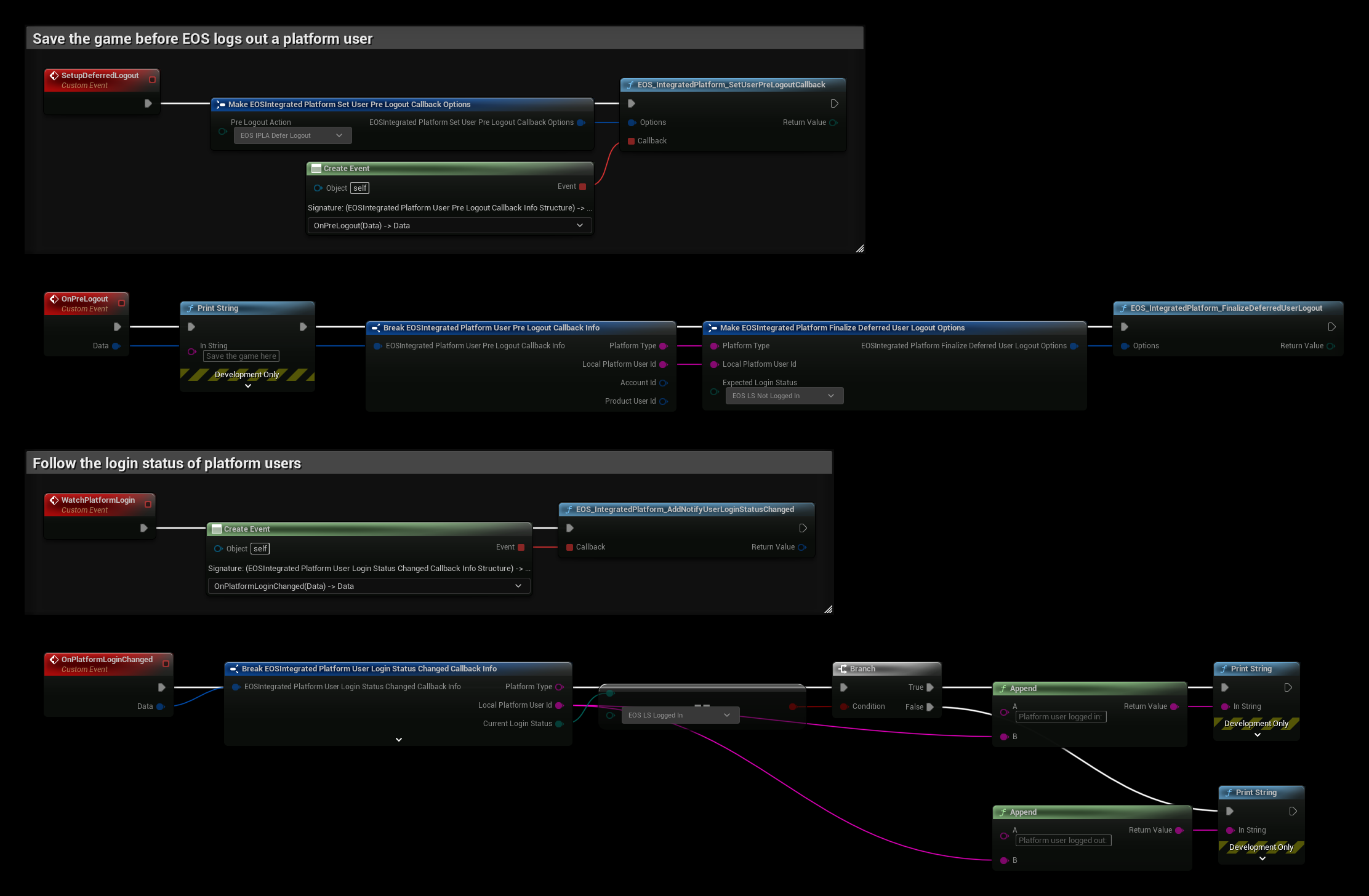
- SetupDeferredLogout calls EOS_IntegratedPlatform_SetUserPreLogoutCallback with Pre Logout Action set to EOS IPLA Defer Logout. Call it once after the EOS platform is created.
- When the platform user logs out, OnPreLogout is called. Save the game where the example prints Save the game here, then call EOS_IntegratedPlatform_FinalizeDeferredUserLogout with the same Platform Type and Local Platform User Id, and Expected Login Status set to EOS LS Not Logged In. If the save is asynchronous, call Finalize when it completes.
- WatchPlatformLogin binds EOS_IntegratedPlatform_AddNotifyUserLoginStatusChanged. OnPlatformLoginChanged checks the Current Login Status and prints whether the platform user logged in or out.