EOS Interfaces
Progression Snapshot
The Progression Snapshot interface stores a snapshot of a player's progression on the EOS backend, as a list of key/value text pairs, for example the player's level, character and chapter. EOS uses the snapshots when a player merges several Epic accounts into one: the player sees the progression of each account and picks the one to keep.
Requirements
- A logged in user with a Product User Id (Connect login)
Common Nodes
| Node | Use |
|---|---|
EOS_ProgressionSnapshot_BeginSnapshot | Starts a new snapshot and returns its Snapshot Id |
EOS_ProgressionSnapshot_AddProgression | Adds one key/value pair to the snapshot |
EOS_ProgressionSnapshot_SubmitSnapshot | Sends the snapshot to the backend |
EOS_ProgressionSnapshot_EndSnapshot | Frees the local snapshot |
EOS_ProgressionSnapshot_DeleteSnapshot | Deletes the stored snapshots of the player |
Example
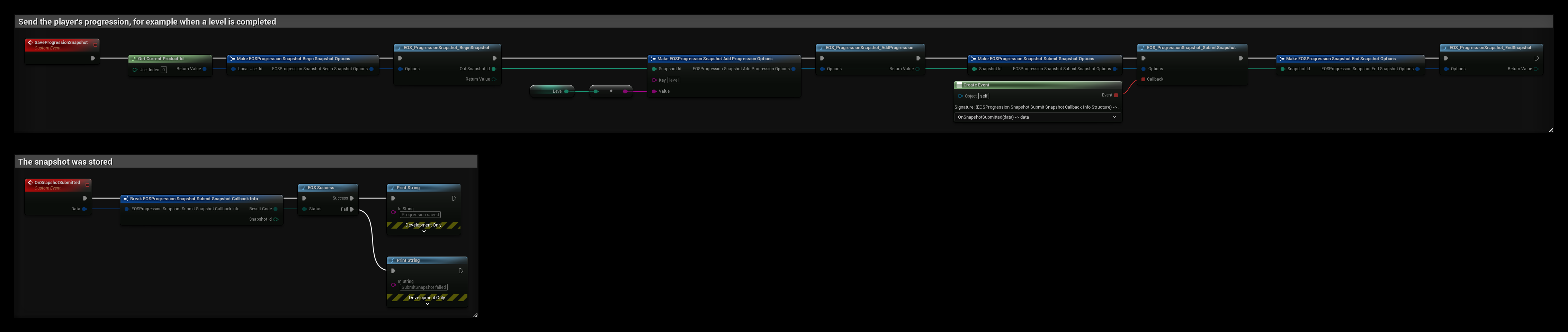
The SaveProgressionSnapshot event stores the player's level:
- EOS_ProgressionSnapshot_BeginSnapshot starts a snapshot for the Product User Id and returns the Out Snapshot Id the other nodes use.
- EOS_ProgressionSnapshot_AddProgression adds
levelwith the value of Level. Call it once for every key. Keys and values are text, so convert numbers to strings. - EOS_ProgressionSnapshot_SubmitSnapshot sends all pairs, and OnSnapshotSubmitted is called with the result.
- EOS_ProgressionSnapshot_EndSnapshot frees the snapshot. You can call it right after Submit.
A new snapshot replaces the previous one, so always add all keys, not only the ones that changed.