EOS Interfaces
Metrics
The Metrics interface records when a player starts and stops playing. EOS uses it for the player and session statistics in the Developer Portal, such as daily active users and play time.
Common Nodes
| Node | Use |
|---|---|
EOS_Metrics_BeginPlayerSession | The player started playing |
EOS_Metrics_EndPlayerSession | The player stopped playing |
Example
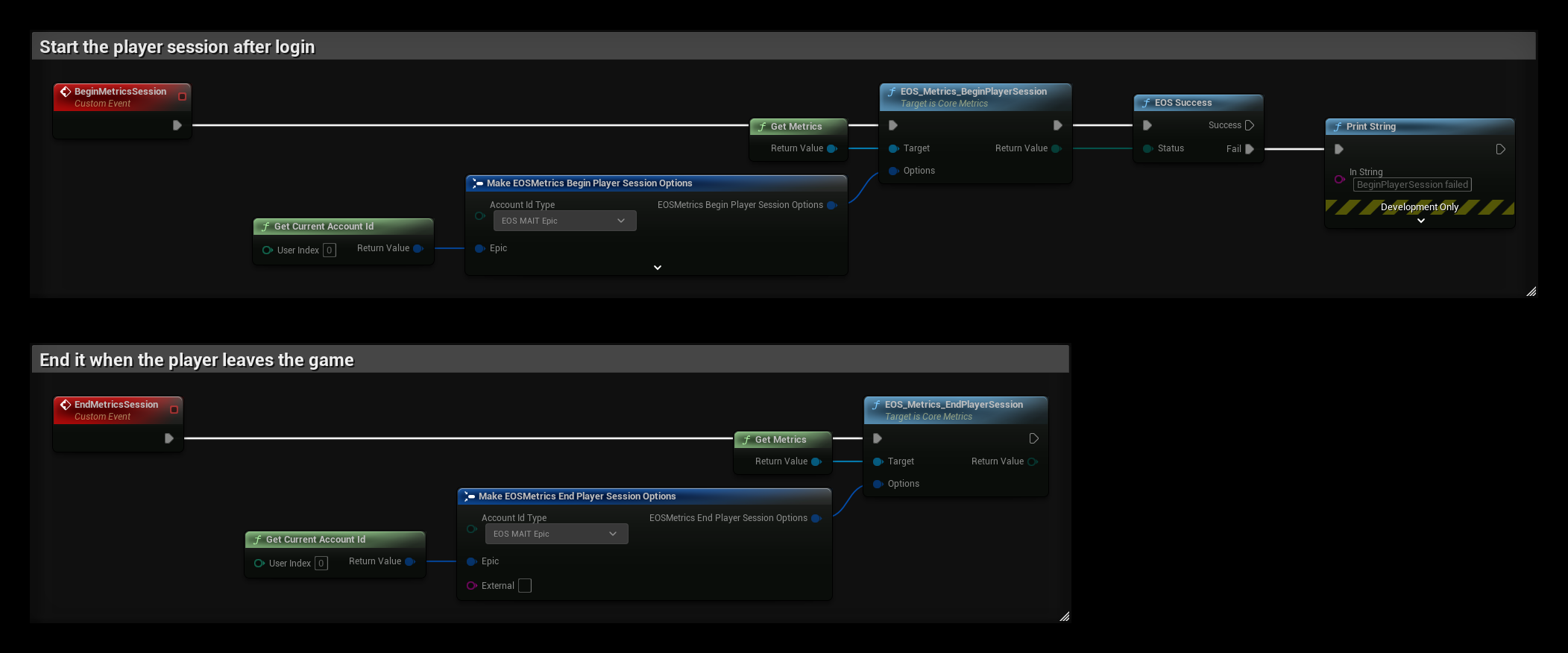
- Call BeginMetricsSession after login. Account Id Type says which id identifies the player: EOS MAIT Epic uses the Epic Account Id in Epic, and EOS MAIT External uses the text in External, for example a Steam id or a DeviceId login.
- Display Name is the name shown for the player. Controller Type, Server Ip and Game Session Id are optional and let you split the statistics by input device and game session.
- Call EndMetricsSession with the same Account Id Type and id when the player leaves the game or logs out.
tip
Begin a new player session for every login, and always end it, also when the player returns to the main menu and logs in with another account.