EOS Interfaces
Kids Web Services (KWS)
The KWS interface handles age gates and parental consent through Epic's Kids Web Services. Use it when your game has players under the age of consent in their country, and you need a parent's permission before you turn on features such as chat or voice.
Requirements
- KWS must be enabled for your product in the Developer Portal, with the permissions your game uses.
- The player must be logged in with the Connect interface. KWS uses the Product User Id.
Common Nodes
| Node | Use |
|---|---|
EOS_KWS_QueryAgeGate | Downloads the player's country and the age of consent there |
EOS_KWS_CreateUser | Creates a KWS user with a date of birth and, for minors, the parent's email |
EOS_KWS_QueryPermissions | Downloads the permissions and the minor status of the player |
EOS_KWS_GetPermissionsCount + EOS_KWS_CopyPermissionByIndex | Reads the downloaded permissions |
EOS_KWS_GetPermissionByKey | Reads the status of one permission, for example chat |
EOS_KWS_RequestPermissions | Asks the parent for one or more permissions (at most 16 per request) |
EOS_KWS_UpdateParentEmail | Changes the parent's email, the consent request is sent again |
EOS_KWS_AddNotifyPermissionsUpdateReceived | Called when a parent grants or rejects a permission |
The async nodes (QueryAgeGate, CreateUser, QueryPermissions, RequestPermissions and UpdateParentEmail) are under EOSCore > KWS > Async and have an On Callback pin.
Typical Flow
- Call EOS_KWS_QueryAgeGate to get the Age Of Consent for the player's country, then ask the player for their date of birth.
- Call EOS_KWS_QueryPermissions. If the player has no KWS user yet, call EOS_KWS_CreateUser with the Date Of Birth (
YYYY-MM-DD) and, for minors, the Parent Email. - Check each feature with EOS_KWS_GetPermissionByKey. The status is Granted, Rejected or Pending.
- For permissions that are not granted, call EOS_KWS_RequestPermissions with the Permission Keys. The parent gets an email.
- Bind EOS_KWS_AddNotifyPermissionsUpdateReceived to turn the feature on when the parent answers, then query the permissions again.
note
KWS only gives you the permission status. Your game must turn the feature off itself while a permission is not granted.
Example
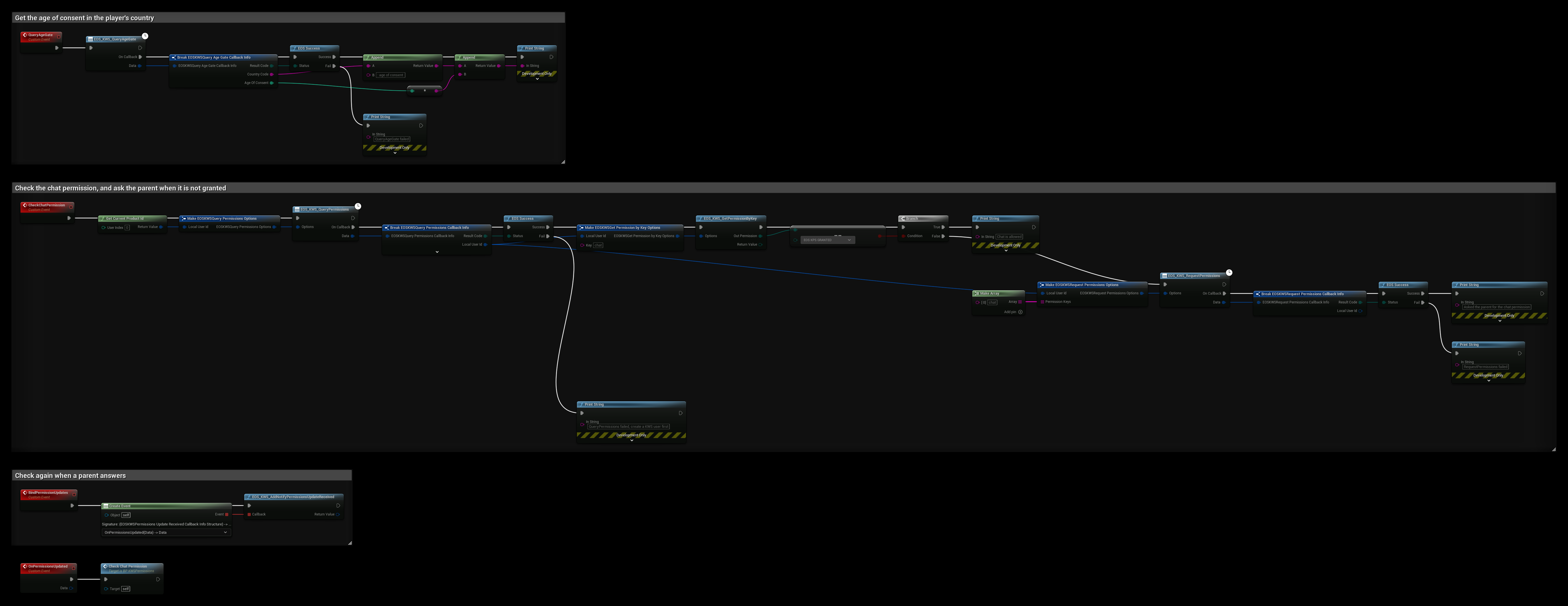
- QueryAgeGate prints the player's Country Code and the Age Of Consent there. Use it to decide if you must ask for the date of birth.
- CheckChatPermission downloads the permissions with EOS_KWS_QueryPermissions, then reads
chatwith EOS_KWS_GetPermissionByKey. If the status is EOS KPS GRANTED, chat is allowed. Otherwise EOS_KWS_RequestPermissions asks the parent forchat. If QueryPermissions fails because the player has no KWS user yet, call EOS_KWS_CreateUser first. - BindPermissionUpdates binds EOS_KWS_AddNotifyPermissionsUpdateReceived once after login. OnPermissionsUpdated runs CheckChatPermission again when the parent answers.
A status of EOS KPS PENDING means a request was already sent and the parent hasn't answered. You can skip a new request in that case, so the parent doesn't get another email.