EOS Interfaces
Ecom (Epic Games Store)
The Ecom interface handles offers, purchases and entitlements for games sold on the Epic Games Store. It needs an Epic Account login (Auth interface), not only a Connect login.
Common Nodes
| Node | Use |
|---|---|
EOS_Ecom_QueryOffers | Downloads the offers in your catalog |
EOS_Ecom_GetOfferCount + EOS_Ecom_CopyOfferByIndex | Reads offers (title, price, currency) |
EOS_Ecom_Checkout | Opens the purchase flow in the EOS overlay |
EOS_Ecom_GetTransactionCount + EOS_Ecom_CopyTransactionByIndex | Reads finished transactions, release them with EOS_Ecom_Transaction_Release |
EOS_Ecom_QueryEntitlements | Downloads what the player owns |
EOS_Ecom_GetEntitlementsCount + EOS_Ecom_CopyEntitlementByIndex | Reads entitlements |
EOS_Ecom_QueryOwnership | Checks if the player owns specific catalog items, for example DLC |
EOS_Ecom_RedeemEntitlements | Marks consumable entitlements as redeemed |
EOS_Ecom_GetLastRedeemEntitlementsResultCount + EOS_Ecom_CopyLastRedeemEntitlementsResultByIndex | Reads which entitlement ids the last redeem call changed |
EOS_Ecom_QueryOwnershipToken / EOS_Ecom_QueryEntitlementToken | Signed tokens your backend can verify |
Example
Reading the offers

The QueryOffers event downloads the offers in your catalog and prints the title and id of each one:
- Get Current Account Id gives the Epic Account Id of the logged in player. Ecom uses the Epic Account Id, not the Product User Id.
- EOS_Ecom_QueryOffers downloads the offers. Leave Override Catalog Namespace empty to use the catalog of your sandbox.
- When the query succeeds, EOS_Ecom_GetOfferCount returns the number of offers, and the For Loop reads each one with EOS_Ecom_CopyOfferByIndex. An offer has the Id you pass to Checkout, the Title Text, the Currency Code and the prices.
Buying an offer
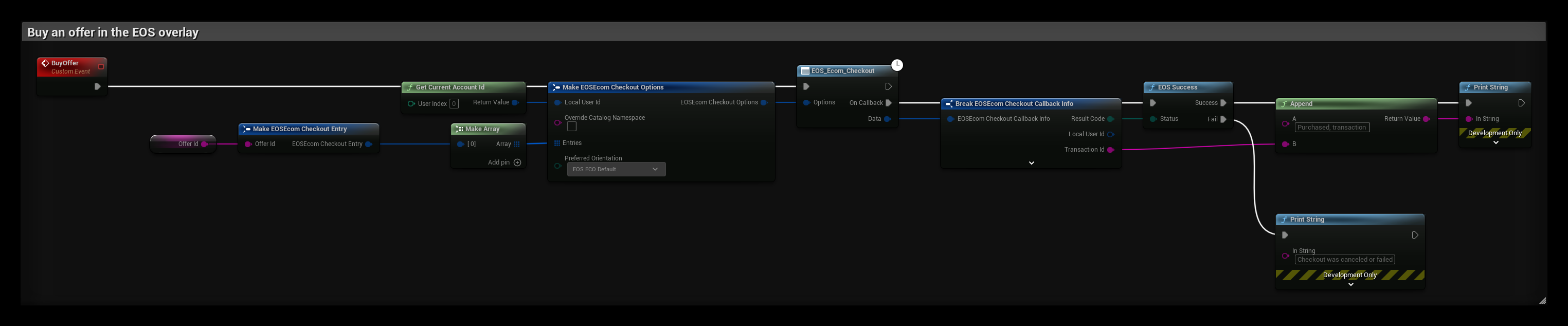
The BuyOffer event opens the purchase flow in the EOS overlay for the offer in Offer Id:
- Make one EOSEcom Checkout Entry per offer and put them in Entries. The player can buy several offers in one checkout.
- EOS_Ecom_Checkout opens the overlay and calls On Callback when the player closes it.
- On Success, Transaction Id identifies the purchase. Fail is also called when the player cancels.
Checking ownership of a DLC

The CheckDLCOwnership event checks if the player owns the catalog item in Dlc Item Id:
- EOS_Ecom_QueryOwnership takes an array of Catalog Item Ids, so you can check several items in one call.
- Item Ownership has one entry per item. The For Each Loop compares each Ownership Status with EOS OS Owned.
Notes
- Checkout uses the EOS overlay, so it only works in a Standalone or packaged game started with the overlay enabled.
- Grant items from the transaction or from a fresh QueryEntitlements, never from the client alone. For important items, verify an ownership or entitlement token on your server.
- The
EOSCoreOnline Subsystem Store/Purchase interface is only available when the game was started from the Epic Games Launcher (-EpicPortal).