Friends, Presence and User Info
These interfaces use Epic Account Services and need an Epic Account login (Auth interface) with the matching permissions (scopes), see Scope Consent.
The EOSCore Online Subsystem also implements IOnlineFriends, IOnlinePresence, IOnlineUser and parts of IOnlineExternalUI (login, friends overlay, web URL), so C++ code and plugins that use the Online Subsystem can use them as well. In Blueprints, use the EOSCore nodes below. See Supported Platforms and Features.
Friends
| Node | Use |
|---|---|
EOS_Friends_QueryFriends | Downloads the friends list (needs the Friends List scope) |
EOS_Friends_GetFriendsCount + EOS_Friends_GetFriendAtIndex | Reads the friends' Epic Account Ids |
EOS_Friends_GetStatus | Friend, invite sent, invite received or not friends |
EOS_Friends_SendInvite, EOS_Friends_AcceptInvite, EOS_Friends_RejectInvite | Friend invites |
EOS_Friends_AddNotifyFriendsUpdate | Called when the friends list changes |
Example: reading the friends list

The QueryFriends event downloads the friends list of the local player and prints each friend:
- EOS_Friends_QueryFriends downloads the list for the Epic Account Id from Get Current Account Id.
- When the query succeeds, EOS_Friends_GetFriendsCount returns the number of friends, and the For Loop reads each one with EOS_Friends_GetFriendAtIndex.
- EOSEpic Account Id to String turns the id into text. To show the friend's name, query it with EOS_UserInfo_QueryUserInfo, see Player Name.
Example: getting notified about changes
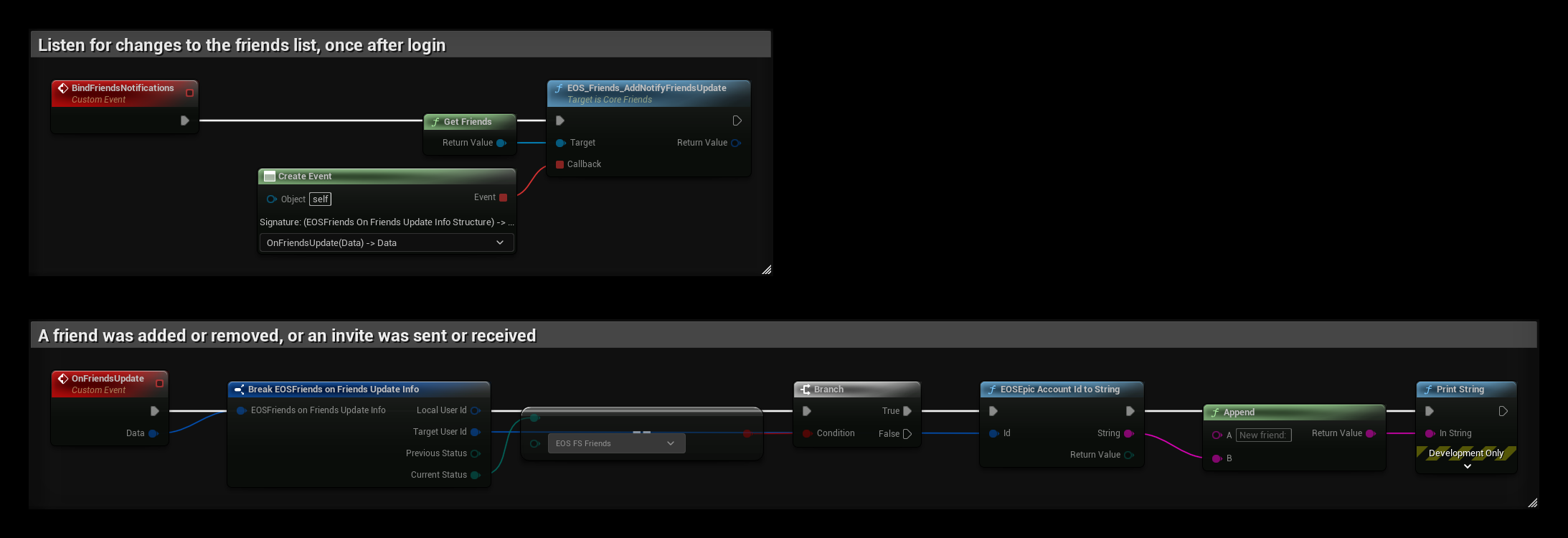
Call BindFriendsNotifications once after login. EOS_Friends_AddNotifyFriendsUpdate then calls OnFriendsUpdate every time the status of a friend changes, for example when an invite is sent, received or accepted. Previous Status and Current Status tell you what changed. In this example, a new friend is printed when Current Status becomes EOS FS Friends. Keep the returned notification id if you want to remove the notification later.
Presence
| Node | Use |
|---|---|
EOS_Presence_CreatePresenceModification | Creates a modification handle |
EOS_PresenceModification_SetStatus, SetRawRichText, SetData, SetJoinInfo | Online status, rich text ("In a match"), key/value data and the join info friends use to join you |
EOS_PresenceModification_SetTemplateId, SetTemplateData | Rich presence from a localized template set up in the Developer Portal, with values for its placeholders |
EOS_Presence_SetPresence | Sends the modification, then EOS_PresenceModification_Release |
EOS_Presence_QueryPresence + EOS_Presence_CopyPresence | Reads a friend's presence |
EOS_Presence_AddNotifyOnPresenceChanged | Called when a friend's presence changes |
EOS_Presence_AddNotifyJoinGameAccepted | The player pressed Join on a friend in the social overlay, see Join Friends Game |
Example: setting the presence

The SetInMatchPresence event shows "In a match" next to the player's name in the friends list:
- EOS_Presence_CreatePresenceModification creates a handle that collects the changes.
- EOS_PresenceModification_SetStatus sets the online status, and EOS_PresenceModification_SetRawRichText sets the text. Use SetData and SetJoinInfo on the same handle for key/value data and join info.
- EOS_Presence_SetPresence sends all changes at once.
- Release the handle with EOS_PresenceModification_Release when the call is done.
User Info
| Node | Use |
|---|---|
EOS_UserInfo_QueryUserInfo | Downloads a user's account info |
EOS_UserInfo_CopyUserInfo | Display name, country, language |
EOS_UserInfo_CopyBestDisplayName | The name to show for a player, also for players from other platforms |
EOS_UserInfo_QueryUserInfoByDisplayName | Finds a user by display name |
See Player Name for an example.