Anti-Cheat
EOS Anti-Cheat protects the game client and lets the server check that clients are protected. The game must be started through the Anti-Cheat launcher with a protected build, see the EOS documentation for how to set this up.
Anti-Cheat needs an external account. A DeviceId login is not enough, see DeviceId.
Client-Server Mode
Use this mode with a dedicated or listen server.
Server (AntiCheatServer nodes):
EOS_AntiCheatServer_AddNotifyMessageToClient: send the message to that client over your own network channel (for example a reliable RPC)EOS_AntiCheatServer_AddNotifyClientActionRequired: kick the client when EOS asks for itEOS_AntiCheatServer_BeginSessionwhen the server startsEOS_AntiCheatServer_RegisterClientfor each connecting player,EOS_AntiCheatServer_UnregisterClientwhen they leaveEOS_AntiCheatServer_ReceiveMessageFromClientfor each anti-cheat message from a clientEOS_AntiCheatServer_EndSessionwhen the server stops
Client (AntiCheatClient nodes):
EOS_AntiCheatClient_AddNotifyMessageToServer: send the message to the server over your own network channelEOS_AntiCheatClient_BeginSessionin client-server mode when you connect,EOS_AntiCheatClient_EndSessionwhen you leaveEOS_AntiCheatClient_ReceiveMessageFromServerfor each anti-cheat message from the serverEOS_AntiCheatClient_AddNotifyClientIntegrityViolated: the client is not protected
Module and system checks
Two client nodes check the anti-cheat module that the bootstrapper loaded:
EOS_AntiCheatClient_GetModuleBuildIdreturns the build id of the loaded module, useful in logs and bug reports.EOS_AntiCheatClient_GetSystemRequirementStatuschecks one Client System Config, for example the crypto processor (TPM), and returns Fully Met, Met With Warning or Not Met with a reason.
Both return EOS_NotFound when the game was started without the anti-cheat bootstrapper.
Peer-to-Peer Mode
Without a trusted server, every client registers the other players with EOS_AntiCheatClient_RegisterPeer, and forwards messages with EOS_AntiCheatClient_AddNotifyMessageToPeer and EOS_AntiCheatClient_ReceiveMessageFromPeer.
Gameplay Events
The server can send gameplay events to the Anti-Cheat backend for analysis, for example EOS_AntiCheatServer_LogPlayerSpawn, EOS_AntiCheatServer_LogPlayerTakeDamage, EOS_AntiCheatServer_LogGameRoundStart and EOS_AntiCheatServer_LogGameRoundEnd.
Reports and Sanctions
Players can report each other with EOS_Reports_SendPlayerBehaviorReport. Use EOS_Sanctions_QueryActivePlayerSanctions to check if a player is banned, and the Web API sanctions functions to create sanctions from a server or tool. Reports and Sanctions use the Product User Id (Connect login), and must be allowed in your client policy.
Reporting a player
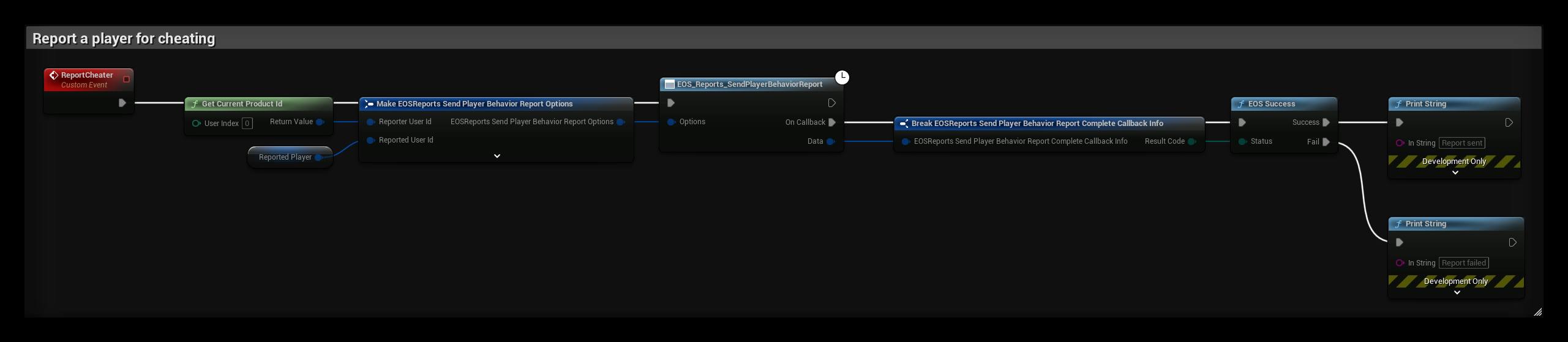
The ReportCheater event reports the player in Reported Player for cheating:
- Reporter User Id is the local player, from Get Current Product Id. Reported User Id is the Product User Id of the other player, for example from the lobby or session members.
- Report Category is the reason, here EOS PRC Cheating. Message is optional text from the player, and Context is optional JSON your tools can read.
Checking sanctions

The CheckSanctions event lists the active sanctions of the player in Target Player, for example when a player joins your server:
- EOS_Sanctions_QueryActivePlayerSanctions downloads the active sanctions of Target User Id.
- When the query succeeds, EOS_Sanctions_GetPlayerSanctionCount returns the number of sanctions, and the For Loop reads each one with EOS_Sanctions_CopyPlayerSanctionByIndex.
- Action is the action string the sanction was created with. Kick or block the player when it is one your game treats as a ban.