EOS Interfaces
RTC Data
RTC Data sends small binary messages to the other players in an RTC room, the same room that is used for voice. Use it for data that belongs with the voice chat, for example who is talking in a squad or push-to-talk state.
Requirements
- Join the room with the data channel enabled: add the flag
4(EOS_RTC_JOINROOMFLAGS_ENABLE_DATACHANNEL) to the Flags of EOS_RTC_JoinRoom. Lobby rooms with RTC turned on also accept the flag in the lobby's RTC options. - See Voice Chat (RTC) for how rooms and voice credentials work.
Common Nodes
| Node | Use |
|---|---|
EOS_RTC_GetDataInterface | Returns the RTC Data handle that the other nodes take |
EOS_RTCData_SendData | Sends a message to everyone in the room |
EOS_RTCData_AddNotifyDataReceived | Called for each message from another player |
EOS_RTCData_UpdateSending | Turns sending on or off for the local player |
EOS_RTCData_UpdateReceiving | Turns receiving on or off, for all players or one Participant Id |
EOS_RTCData_AddNotifyParticipantUpdated | Called when a participant's data status changes |
EOS_RTC_AddNotifyRoomBeforeJoin | Called just before the local player joins a room, for example to bind the data notifications early |
The data is a Byte array. Core String To Byte and Core Bytes To String convert text, other data you convert yourself. A message can be at most 1170 bytes.
Example
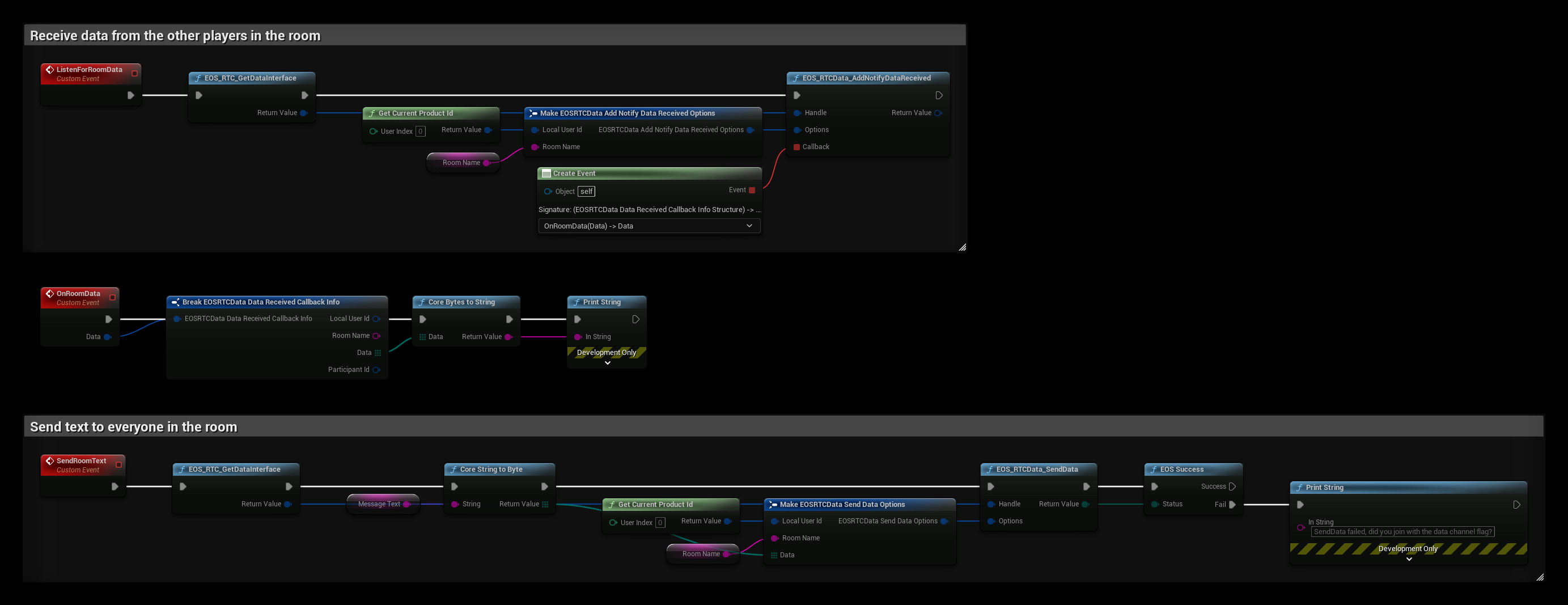
The example uses the variables Room Name, the RTC room the player has joined, and Message Text.
- ListenForRoomData gets the handle with EOS_RTC_GetDataInterface and binds EOS_RTCData_AddNotifyDataReceived for the room. OnRoomData turns the received bytes into text and prints it. Participant Id in the callback info is the sender.
- SendRoomText turns Message Text into bytes and sends them with EOS_RTCData_SendData to everyone in the room. It fails if the room was joined without the data channel flag.
Bind the notification after joining the room, or from EOS_RTC_AddNotifyRoomBeforeJoin so you don't miss the first messages.