EOS Interfaces
Voice Moderation (RTC Admin)
The RTC Admin interface lets a trusted server moderate EOS voice rooms. It can kick a player from a room, mute a player for everyone in the room, and create the tokens players use to join rooms.
To set up voice rooms with your own server, see Voice Chat (RTC/EOS Voice).
Requirements
- A client with a Trusted Server policy that allows the voice features, see Voice Server Credentials. Use it in a separate EOS configuration for your server, see Project Settings. Don't ship it with the game client.
- Enable RTC turned on in the configuration
Nodes
| Node | Use |
|---|---|
EOS_RTCAdmin_QueryJoinRoomToken | Creates tokens for players to join a room |
EOS_RTCAdmin_CopyUserTokenByIndex, EOS_RTCAdmin_CopyUserTokenByUserId | Read the tokens inside the QueryJoinRoomToken callback |
EOS_RTCAdmin_Kick | Removes a player from a room and revokes their token |
EOS_RTCAdmin_SetParticipantHardMute | Mutes or unmutes a player for everyone in the room |
The RTC Admin nodes need a target: connect Get RTCAdmin.
Example
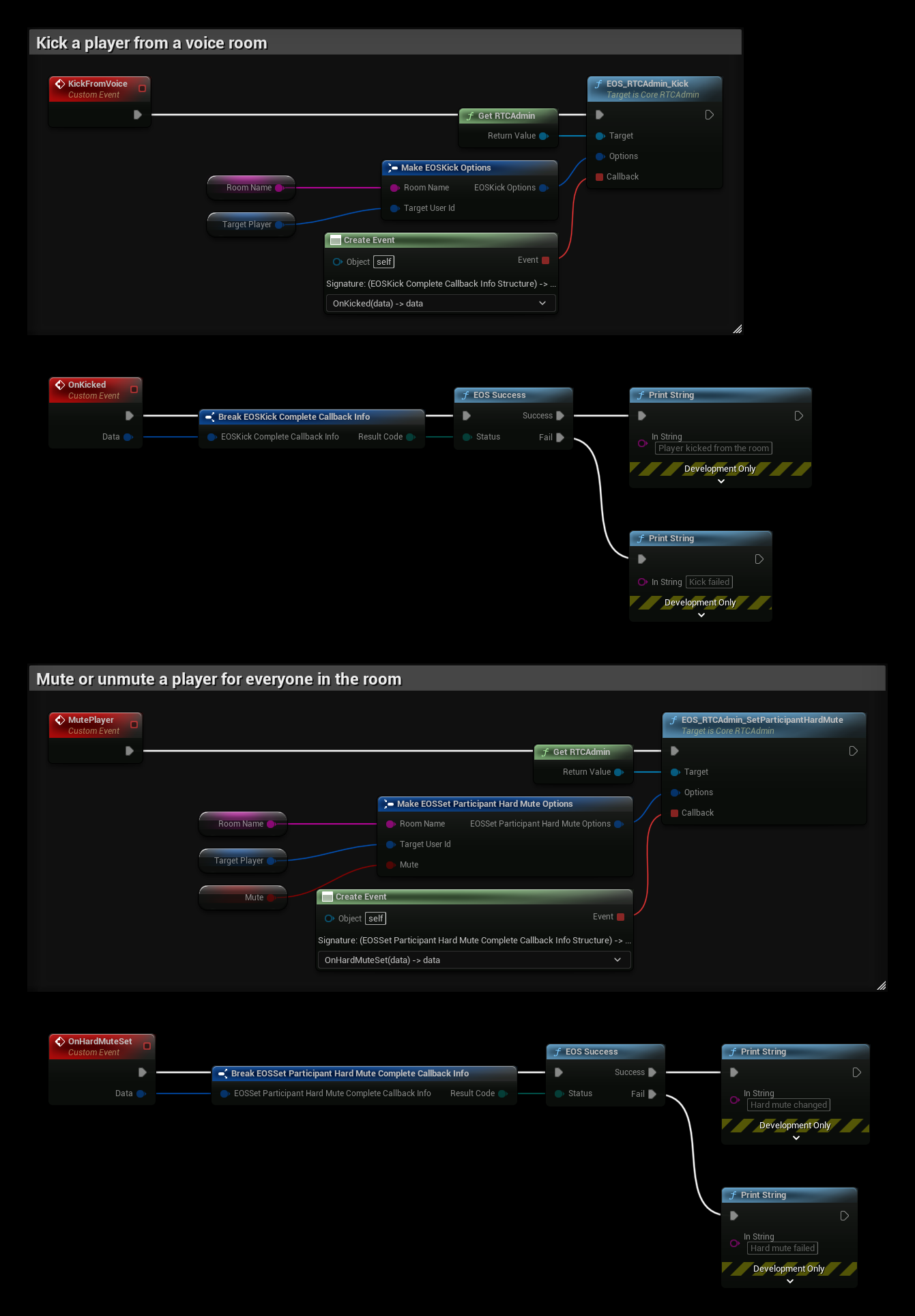
The example uses the variables Room Name, the voice room, and Target Player, the Product User Id of the player.
- KickFromVoice calls EOS_RTCAdmin_Kick. The player leaves the room and can't join it again with the same token. OnKicked is called with the result.
- MutePlayer calls EOS_RTCAdmin_SetParticipantHardMute with Mute. True mutes the player and false unmutes them. OnHardMuteSet is called with the result.
A hard mute is different from a local mute: no other player in the room hears the muted player, and the player can't unmute themselves. To let each player mute others only for themselves, use the RTC Audio nodes in the game client instead.
Notes
- EOSCore has a Get RTCData node for the RTC Data interface, but no RTC Data nodes yet.