Sessions
The Sessions interface creates, finds and joins EOS sessions directly. A session is an entry on the EOS backend that describes a game: its settings, its attributes and the players in it. Players find it with a search and join it, then connect to the game server or host themselves.
For most games, the Online Subsystem nodes in Creating a Session and Finding a Session are simpler, since they also travel to the server. Use the Sessions interface when you need full control, for example to manage sessions from your own server code.
Requirements
- A logged in user with a Product User Id (Connect login), see Authentication
- The Sessions feature allowed in your client policy
Common Nodes
| Node | Use |
|---|---|
EOS_Sessions_CreateSessionModification | Starts the settings of a new session and returns a modification handle |
EOS_Sessions_UpdateSessionModification | Starts changes to a session you already created |
EOS_SessionModification_AddAttributeString (also Bool, Int64, Double) | Adds an attribute that searches can filter on |
EOS_SessionModification_SetHostAddress | Sets the address players connect to |
EOS_Sessions_UpdateSession | Creates or updates the session on the backend |
EOS_Sessions_CreateSessionSearch | Starts a search and returns a search handle |
EOS_SessionSearch_SetParameterString (also Bool, Int64, Double) | Adds a filter to the search |
EOS_SessionSearch_Find | Runs the search |
EOS_SessionSearch_GetSearchResultCount, EOS_SessionSearch_CopySearchResultByIndex | Read the results as session details handles |
EOS_SessionDetails_CopyInfo | Reads the id, host address and settings of a result |
EOS_Sessions_JoinSession | Joins a session from a search result or an invite |
EOS_Sessions_StartSession, EOS_Sessions_EndSession | Marks the game as started or ended |
EOS_Sessions_RegisterPlayers, EOS_Sessions_UnregisterPlayers | The owner adds or removes players that connected or left |
EOS_Sessions_DestroySession | Removes the session |
Example
Creating a session
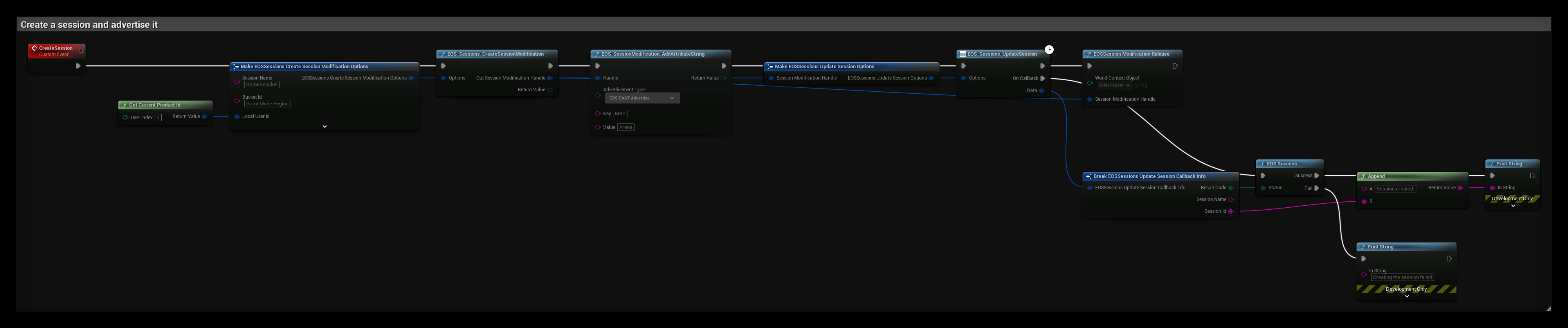
The CreateSession event:
- EOS_Sessions_CreateSessionModification starts a session with the settings in the options:
- Session Name is a local name for the session. The other Sessions nodes, like Start, End and Destroy, use it to find the session.
- Bucket Id groups sessions, for example by game mode and region. Searches must filter on a bucket.
- Max Players is the number of players that can join.
- Presence Enabled shows the session in the player's presence, so friends can join it. Only one session per player can have presence.
- EOS_SessionModification_AddAttributeString adds a
MAPattribute. EOS SAAT Advertise makes it visible in searches. Int64 and Double values are passed as text. - EOS_Sessions_UpdateSession creates the session on the backend. The modification handle is copied when the node runs, so EOSSession Modification Release frees it right away.
- OnCallback returns the Session Id of the new session.
When your game starts, call EOS_Sessions_StartSession. If Join In Progress Allowed is off, players can no longer join after that.
Finding and joining a session
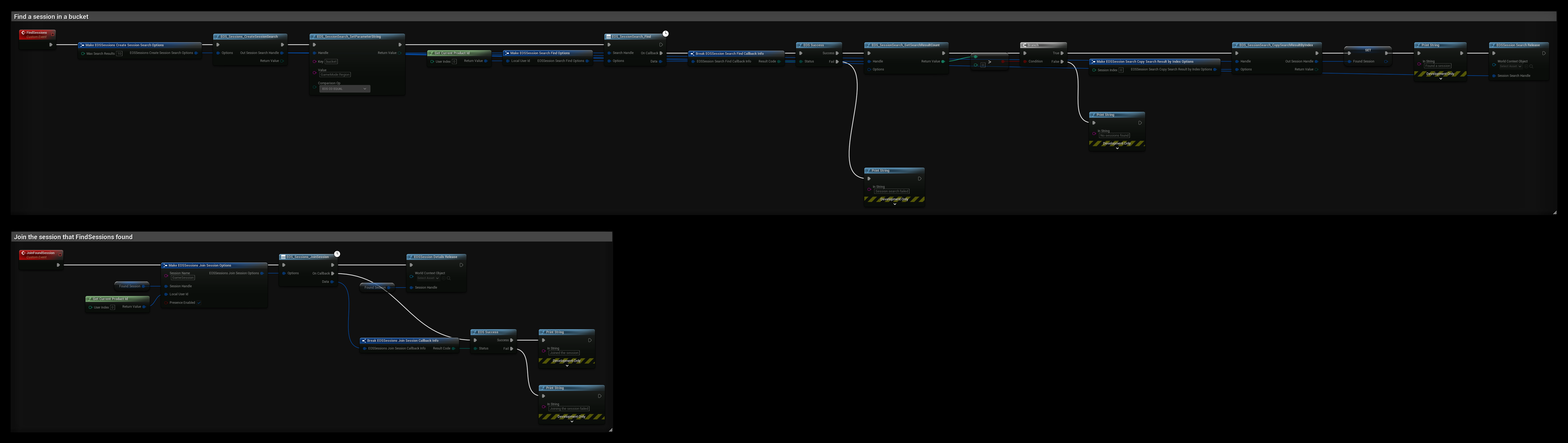
FindSessions:
- EOS_Sessions_CreateSessionSearch starts a search for at most Max Search Results sessions.
- EOS_SessionSearch_SetParameterString filters on the bucket. The key
bucketmatches the Bucket Id the session was created with. Add more parameters to filter on your own attributes, likeMAP. - EOS_SessionSearch_Find runs the search. When it succeeds, EOS_SessionSearch_GetSearchResultCount returns the number of results.
- EOS_SessionSearch_CopySearchResultByIndex copies the first result to the Found Session variable. To list all results, loop from 0 to the count minus 1, and read each result with EOS_SessionDetails_CopyInfo.
- EOSSession Search Release frees the search. The session details handles you copied stay valid.
JoinFoundSession:
- EOS_Sessions_JoinSession joins the session in Found Session under the local Session Name.
- EOSSession Details Release frees the details handle when you don't need it anymore.
- When the join succeeds, connect to the Host Address from the session details. Joining a session does not connect you to the game.
Every handle the Sessions nodes return must be released with the matching Release node: modification, search, session details and active session handles. Unreleased handles keep their memory until the game exits.