EOS Interfaces
Stats
Video Tutorial is available
Stats are numeric values per player (kills, wins, playtime) that EOS aggregates on the backend. Define them in the Developer Portal (Game Services > Stats) with an aggregation type (SUM, LATEST, MIN or MAX). Leaderboards and stat based Achievements are built on stats.
Requirements
- A logged in user with a Product User Id (Connect login)
- The Stats feature allowed in your client policy
Common Nodes
| Node | Use |
|---|---|
EOS_Stats_IngestStat | Sends one or more stat values. The backend aggregates them with the stat's aggregation type |
EOS_Stats_QueryStats | Downloads the stats of a player |
EOS_Stats_GetStatsCount + EOS_Stats_CopyStatByIndex | Reads the downloaded stats |
EOS_Stats_CopyStatByName | Reads one downloaded stat by name |
Notes
- Ingested values are added to the aggregation, they don't replace the stat (except LATEST). Ingest the change (for example
Kills = 1), not the total. - Stats are not updated immediately. Query them again after a short delay if you need the new value.
Example
Ingesting a stat
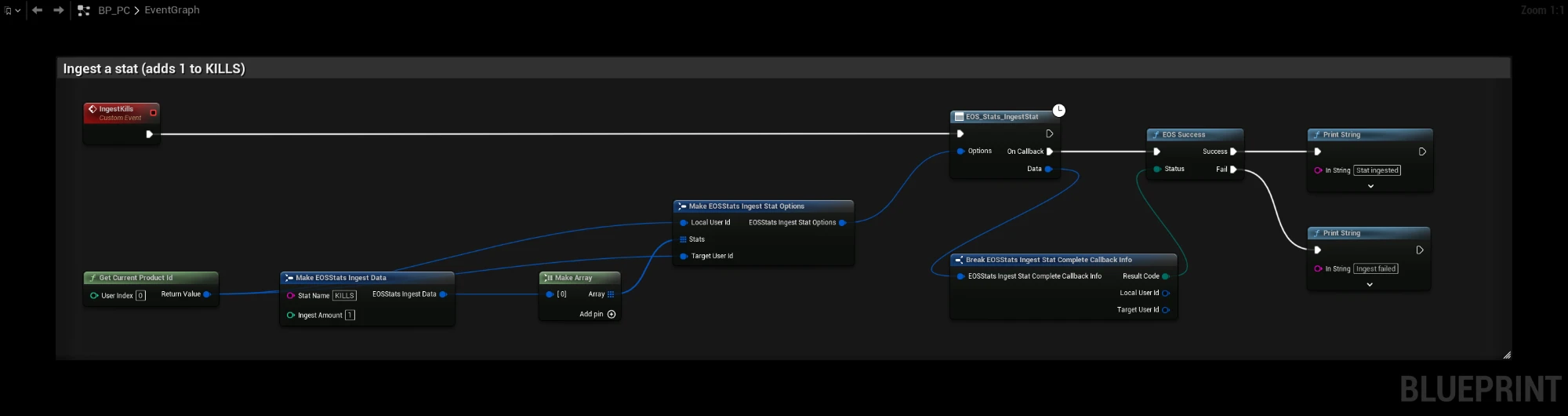
The IngestKills event adds 1 to the KILLS stat of the local player:
- Get Current Product Id gives the Product User Id of the logged in player. Use it as both Local User Id and Target User Id.
- Make one EOSStats Ingest Data per stat. Stat Name is the stat id from the Developer Portal, Ingest Amount is the change.
- EOS_Stats_IngestStat sends the array. EOS Success splits the result code into Success and Fail.
You can send several stats in one call by adding more pins to Make Array.
Reading stats

The QueryStats event downloads the stats of the local player and prints each one:
- EOS_Stats_QueryStats downloads the stats. Leave Stat Names empty to get all stats, or add names to download only those.
- When the query succeeds, EOS_Stats_GetStatsCount returns how many stats were downloaded.
- The For Loop runs from 0 to count - 1 and EOS_Stats_CopyStatByIndex reads each stat. Name and Value are printed.
Use EOS_Stats_CopyStatByName instead of the loop when you only need one stat.
Online Subsystem
The EOSCore Online Subsystem also implements IOnlineStats (UpdateStats, QueryStats).