Authentication: Other Identity Providers
Requires EOSCore 2.0.0 and later.
The Login node can log in with a token from any identity provider that EOS supports. Your game gets the token from the provider's own SDK and passes it to the node. EOSCore then logs in with the Connect interface and creates the EOS user the first time.
Requirements
- The identity provider must be added to your product in the EOS Developer Portal, under Product Settings > Identity Providers, and enabled for the sandbox.
- A way to get the token in your game, usually the provider's SDK or plugin.
Settings
AuthType: EOS_LCT_Password
Credentials Type: <the provider, see the table>

Login Id: The player's display name (required for some providers, see the table)
Password: <not used>
Additional Data: The token
| Credentials Type | Token in Additional Data | Login Id |
|---|---|---|
EOS_ECT_APPLE_ID_TOKEN | Sign in with Apple ID token | Required |
EOS_ECT_GOOGLE_ID_TOKEN | Google Sign-In ID token | Required |
EOS_ECT_AMAZON_ACCESS_TOKEN | Login with Amazon access token | Required |
EOS_ECT_OCULUS_USERID_NONCE | {UserId}|{Nonce} from the Meta Platform SDK | Required |
EOS_ECT_DISCORD_ACCESS_TOKEN | Discord OAuth access token | Optional |
EOS_ECT_GOG_SESSION_TICKET | GOG Galaxy encrypted app ticket | Optional |
EOS_ECT_UPLAY_ACCESS_TOKEN | Ubisoft Connect access token | Optional |
EOS_ECT_ITCHIO_JWT / EOS_ECT_ITCHIO_KEY | itch.io JWT or API key | Optional |
EOS_ECT_VIVEPORT_USER_TOKEN | Viveport user token | Optional |
EOS_ECT_EPIC_ID_TOKEN | Epic Account ID token, for example from EOS_Auth_CopyIdToken | Optional |
EOS_ECT_OPENID_ACCESS_TOKEN | Token from your own OpenID provider | Optional |
EOS_ECT_PSN_ID_TOKEN, EOS_ECT_XBL_XSTS_TOKEN, EOS_ECT_NINTENDO_ID_TOKEN, EOS_ECT_NINTENDO_NSA_ID_TOKEN | Token from the console SDK | Required for Nintendo |
Steam has its own pages: Steam App Ticket and Steam Session Ticket.
The Login Id is sent to EOS as the display name. EOS shows it to other players, for example in leaderboards. It is not part of the authentication.
Errors
The Callback returns bWasSuccessful false with an error message when:
- Additional Data is empty.
- EOS rejects the token, for example because the identity provider is not set up in the Developer Portal or the token has expired.
- The Connect login fails for another reason. Before EOSCore 2.0.0, failed Steam and OpenID logins never called the Callback; now every failed login does.
Example
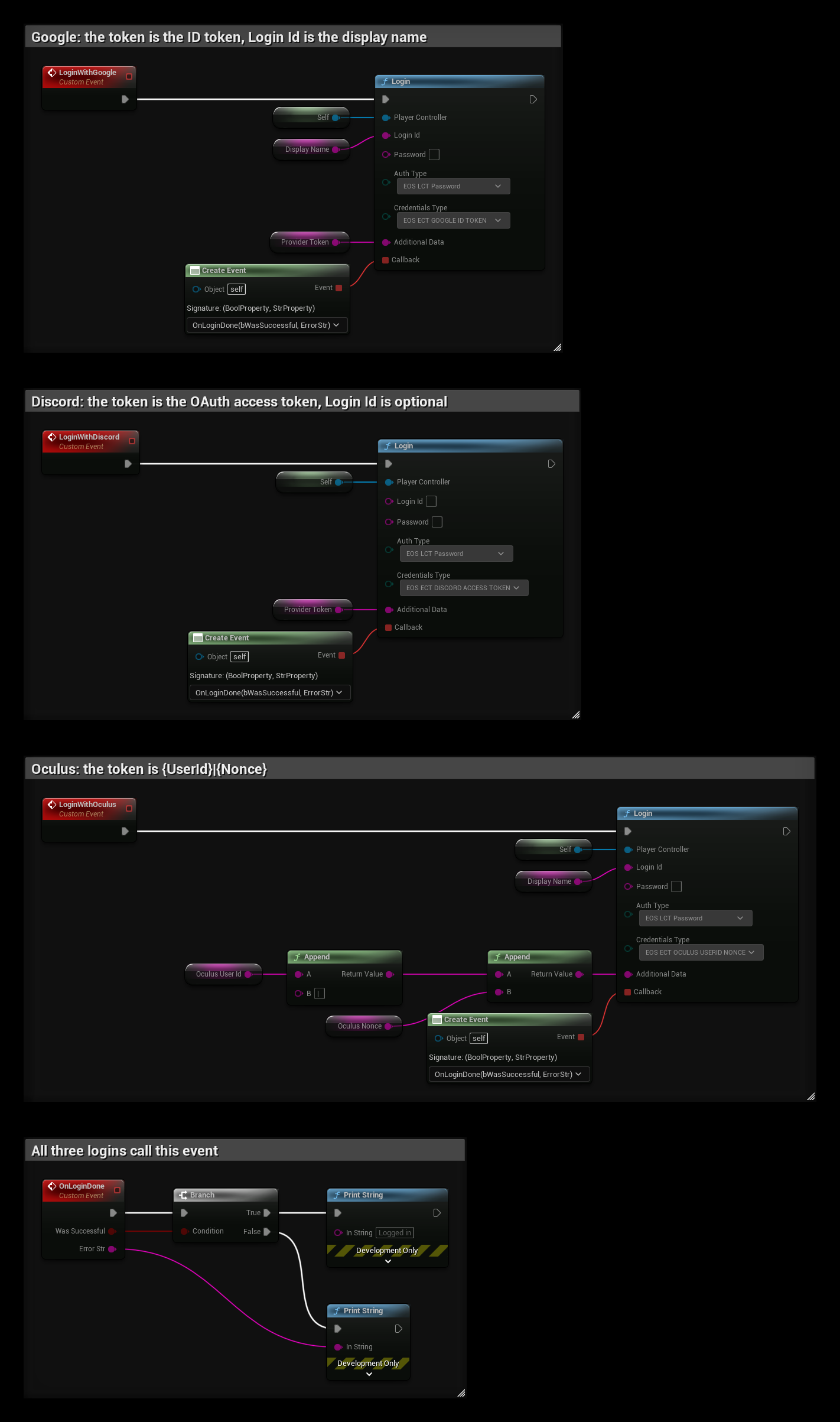
The example is in a Player Controller and uses the variables Display Name and Provider Token. Get the token from the provider's SDK before you call the event.
- LoginWithGoogle passes the Google ID token in Additional Data and the display name in Login Id, which Google requires.
- LoginWithDiscord passes the Discord access token. Login Id is optional, so it is left empty.
- LoginWithOculus builds the token as
{UserId}|{Nonce}with two Append nodes. The user id and nonce come from the Meta Platform SDK. - All three bind OnLoginDone to Callback. It prints Error Str when Was Successful is false.
Connect Self (or your Player Controller) to Player Controller, so EOSCore sets the player's Unique Net Id after the login.