Authentication: Refresh Token
Requires EOSCore 2.0.0 and later.
A refresh token logs the player in to their Epic Account again without showing a login. EOS returns the refresh token after an Epic Account login. Use it when you store the login yourself, for example on a platform where Persistent Auth is not available.
Getting the refresh token
After a successful Epic Account login, call EOS_Auth_CopyUserAuthToken and read Refresh Token from the result. Store it securely, it gives access to the player's account.
Settings
AuthType: EOS_LCT_RefreshToken
Credentials Type: EOS_ECT_EPIC

Login Id: <not used>
Password: The refresh token
Additional Data: <not used>
Refresh tokens expire. If the login fails, log the player in again with another method, for example Account Portal.
Example
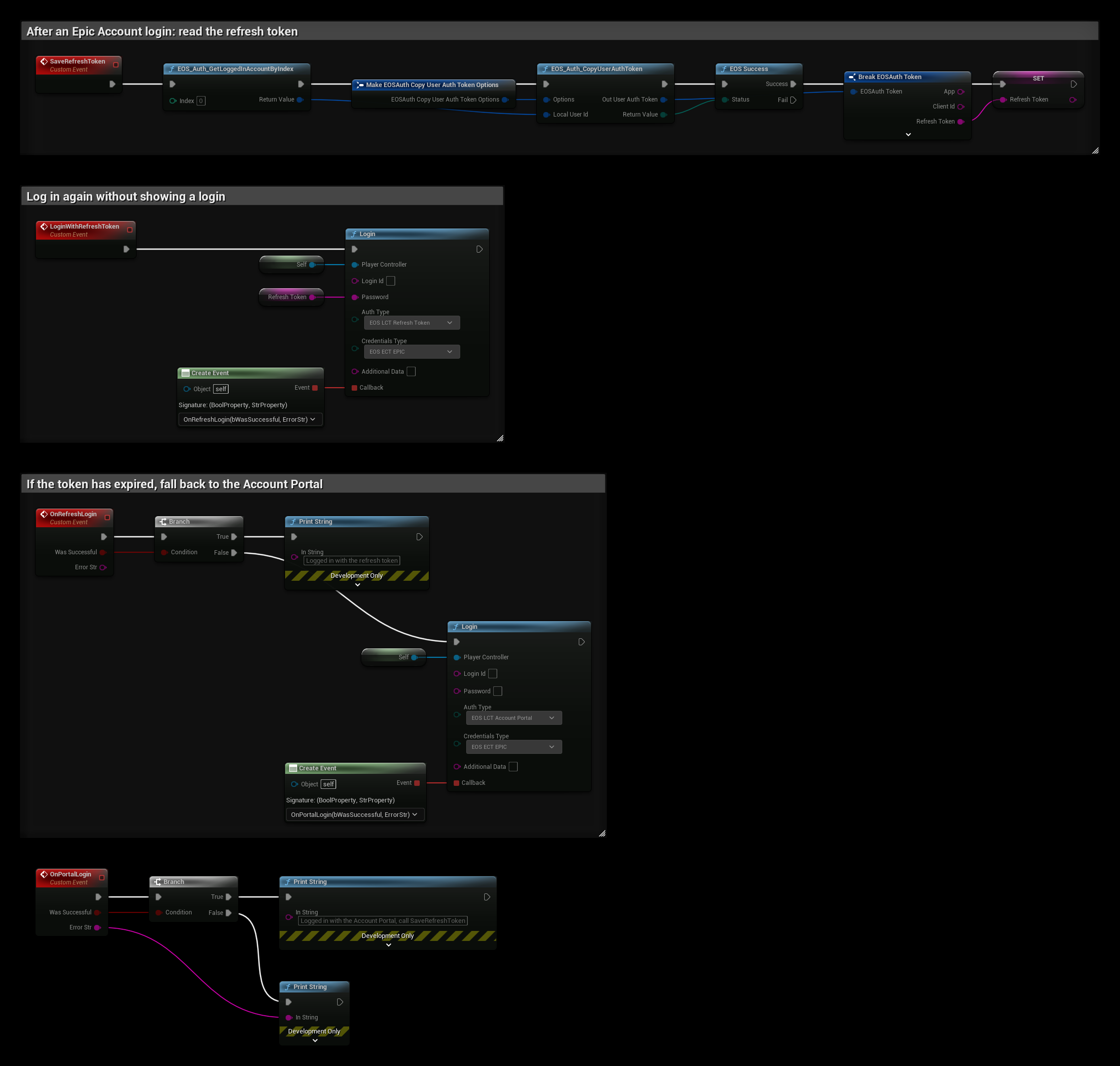
The example is in a Player Controller and keeps the token in the Refresh Token variable. Save it in your own save game between runs.
- SaveRefreshToken runs after an Epic Account login. EOS_Auth_GetLoggedInAccountByIndex gets the logged in account, and EOS_Auth_CopyUserAuthToken copies its token. When the copy succeeds, Refresh Token is read from the token.
- LoginWithRefreshToken calls Login with EOS_LCT_RefreshToken, EOS_ECT_EPIC and the token in Password.
- OnRefreshLogin prints a message when the login succeeds. When it fails, for example because the token has expired, it logs in with the Account Portal instead.
- OnPortalLogin is called when the Account Portal login completes. Call SaveRefreshToken again after it, since the old token no longer works.
To use a refresh token for the automatic login, start the game with -AUTH_TYPE=refreshtoken -AUTH_TOKEN=<token>, see Command Line Arguments.